After launching v1, I stepped back to think. I'm not a natural marketer — I'm a philosophy and product-design person. Here's where a few weeks of thinking have landed.
There are two questions I am currently researching.
UX within the current era is a three-column design
Start from the core, reevaluate how we should interact with software while writing.
How Chinese Bazi contributed to the new design.
My ex-colleague commented on the launch article for Creader back then, saying, "Tim, you should write more and express more, but to me, writing is hard." Not just the content writing, but also the proofreading.
For most articles, I would spend 3-5 days completing them, on and off. I often needed to check the outline and notes. Then, for proofreading, I copied each paragraph into ChatGPT, reviewed the comments, and manually refined the meaning. I wanted to have a strong and consistent flow.
After the launch of v1, I spent the next few months using Creader myself, writing my own book about WW1 and a time loop back into history. At the same time, I kept applying fixes as I encountered problems. This was no longer just product building from the outside. I was experiencing the writing flow as a real user.
So, did the current Creader actually change the way I write? The answer is, sadly, no; I remain on my old path. Rewinding through all these frictions made me think deeply about exactly what we need. Expanding this path into creative writing, we will definitely encounter greater friction. Creative writing has longer context and a stronger demand for editing. I stopped asking what features we should add, and started asking what breaks the act of writing.
When building products in this era, we often fall into the pitfall of delivering features faster and faster. But stacking more and more features is not the right way to improve the product. This was the situation with v1. V1 was done in our imagination, even though we consolidated products and interviewed many authors and creators. I realised the issue was not that we lacked research. The issue was that we had turned research into a feature list, instead of a deeper understanding of writing behaviour.
Before we get into the details of my UI revamp, I want to share some thoughts on product design and the user journey. Since Andrej Karpathy coined the term vibe coding, it captured a new pattern of AI-assisted interaction. Then, Cursor became one of the clearest examples of how AI-assisted coding could be embedded into an IDE. The three-column layout, with file, code and chat, became a key feature. This UI trend has also influenced many other projects, including the standard left- or right-panel layout. AI-assisted coding introduced more review, selection, confirmation, and agent-supervision interactions.
I see this pattern in many AI-driven tools too. Many are following a similar approach. But we need to understand that the core cognition of writing is very different from coding.
Writing depends more on uninterrupted linguistic flow, and typing is where that flow is most directly expressed. With the current left-right panel layout, we are creating more interruptions, fragmenting the writing flow. Creader v1 also carried this pattern. The more I use it, the more workflow friction I find. I find myself questioning why I need to copy and paste my work into GPT all the time. The writing environment was not self-contained enough for me to stay in flow. I then realised the product was not protecting the writing state.
I decided to go on a discovery trip. First, I identified what I want and what is creating friction in my writing. The key conclusion is that we need a way to reduce action-mode switching and keep users within the writing state as much as possible. The app's core action is writing; everything should be prioritised to minimise interruptions.
During writing, authors still need to check outlines, notes, history, or other context. These actions are necessary, but they are not the main action. Writing remains the primary state.
The design challenge is not to remove these secondary actions, but to make them temporary and easy to return from. A writer may leave a sentence for a moment to check context, but they should not feel like they have entered another workspace. In other words, the support layer should orbit around the draft. It should help the writer return to the writing state, not replace it.
This led me to think about how current apps use shortcuts plus my experience with macOS. On macOS, Cmd + Space opens the global search, and Raycast uses Opt + Space. These quick actions keep the user in the flow of the original working state, rather than switching action contexts.
These interactions sparked the first major change: Cmd + K to summon a global search and action panel, similar to Cmd + P in VSCode. The principle became: summon cognition, do not display cognition permanently. Instead of keeping every tool permanently visible, Cmd + K summons temporary layers: chat, chapter information, history, or notes. Pressing Esc dismisses the layer and returns the writer to the draft. The easy-exit design keeps the default interface clean and less distracting. More importantly, it reduces the cost of leaving and returning, so the writing state remains protected.
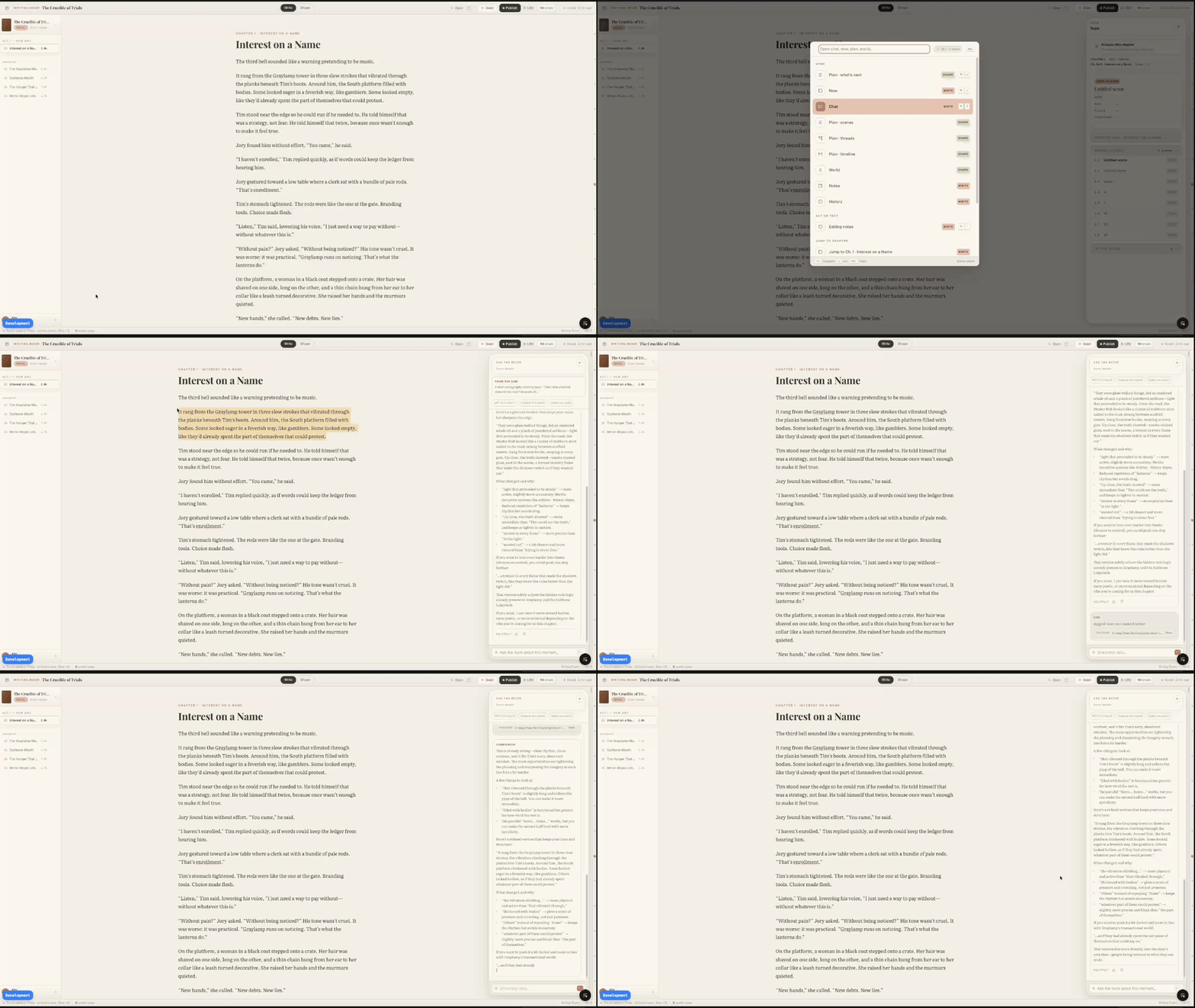
This leads to the second thesis: flow. Writing flow depends not only on concentration, but also on the environment around the writer. In the AI era, maintaining that flow becomes harder because writers constantly move between drafting, prompting, reviewing, waiting, and returning.
For Creader v2, the goal is to create a quieter writing environment: fewer persistent visual components, less information pressure, and a cleaner initial state. Every temporary layer should be easy to dismiss and return from, so the writer can recover the original writing state with minimal friction.
Lastly, I also want to touch on Bazi. During the thesis discovery phase, I spent quite some time looking into Bazi. I started using Bazi and wuxing as a lens to think about different creative states. In this lens, creation can be associated with water, as ideas and creativity require freedom. Rules and structures are part of metal and earth. Here is the feeling from the previous version: we implemented many features, defined the path, and left little room for users to breathe. In a way, it could be good, but for writing, flow is important; we need fewer distractions and less information pressure.
In the v1 UI, we also noticed that the complex interface placed a heavy cognitive load on users when navigating. This metaphor also matched what I observed from a UX perspective: water became a useful metaphor for creative flow. In the interface, this restriction appears as mode switching, button searching, and interruption. The point is reducing the physical and cognitive distance between intention and action.
In psychology, this also connects with the idea of embodied cognition. When the physical action changes less, the user does not need to constantly translate intention into interface navigation. The cognitive path becomes shorter: from thinking -> finding UI -> executing, to thinking -> executing. Interaction design affects the continuity of thought.
Special thanks to @FateTell for the Bazi references that inspired part of this thinking.
All these design changes are not just about interface polish. They are about making it easier for people to stay with their own thoughts long enough to express them.